The short version
Balancing a dragon boat by hand means juggling weights, sides, roles and wishes in a spreadsheet until it feels right. Auto does that juggling for you. It looks at everyone you selected, tries a great many ways to seat them, and hands you the lineup that best balances the boat while respecting your paddlers' roles and preferences. You decide what matters most today. Auto does the arithmetic.
The boat is a see-saw
Most balancing spreadsheets add up the left side against the right and the front half against the back half. That's a good start, but it misses the most important thing: where a paddler sits matters as much as what they weigh.
Think of a see-saw. A heavier person close to the middle can balance a lighter person sitting far out at the end. A dragon boat works the same way around its centre: a paddler on bench 1 or bench 10 tips the boat far more than the same paddler on bench 5 or 6. The drummer and the steerer sit even further out, so their weight counts too.
That's why a boat can be perfectly balanced even though the back half weighs more than the front, and why a boat whose halves weigh the same can still sit nose-down. Auto always thinks in see-saw terms, for left/right as well as for bow/stern.
Comparing with your own spreadsheet? On the weight page of the balance panel, switch to Bank-weighted: it shows the see-saw view instead of plain kilograms. The Moments page shows the same view as a single number for left/right and for bow/stern. Plain kilograms can look balanced while the boat is not, or the other way round.
What Auto looks at
For every paddler you select, Auto uses these fields from the paddler profile:
| Field | How it's used |
|---|---|
| Weight | The basis for balancing the boat. Required: if a selected paddler has no weight (or an implausible one), the Auto-Alignment sheet names them and Generate Lineup stays disabled until you deselect them (Deselect them) or add the weight. |
| Side Preference | A wish. Auto tries hard to keep people on their side, but balance can win. |
| Excluded Side | A hard rule. Auto never puts someone on their excluded side. |
| Position Preference | Front, Middle or Rear. A gentle nudge. |
| Stroke (special role) | Stroke paddlers belong on the first bench, and Auto takes that very seriously. |
| Propulsion Score | Used when Balance propulsion is on and every selected paddler has a score, so that the power on both sides is even. |
Not used: height, gender, age category, experience and how long someone has been in the club. If you want an experienced paddler in a certain seat, pin them there (see below).
Drummer and steerer are never moved by Auto. If they're already seated, their weight is part of the balance.
What Auto cares about, in order
Auto weighs everything against everything else, but roughly:
- Hard rules first. Nobody sits on their excluded side, pinned paddlers stay where they are, locked seats stay empty, and every paddler who can get a seat gets one.
- Roles. Stroke paddlers on the first bench.
- Balance. Left against right, bow against stern towards your target trim, and power between the sides if you use propulsion scores.
- Wishes. Preferred side, then preferred section of the boat.
It doesn't chase perfection where it makes no difference on the water: a boat that is a few kilograms off is treated as balanced, so Auto doesn't sacrifice someone's preferred side for a difference your steerer would never feel.
Target trim
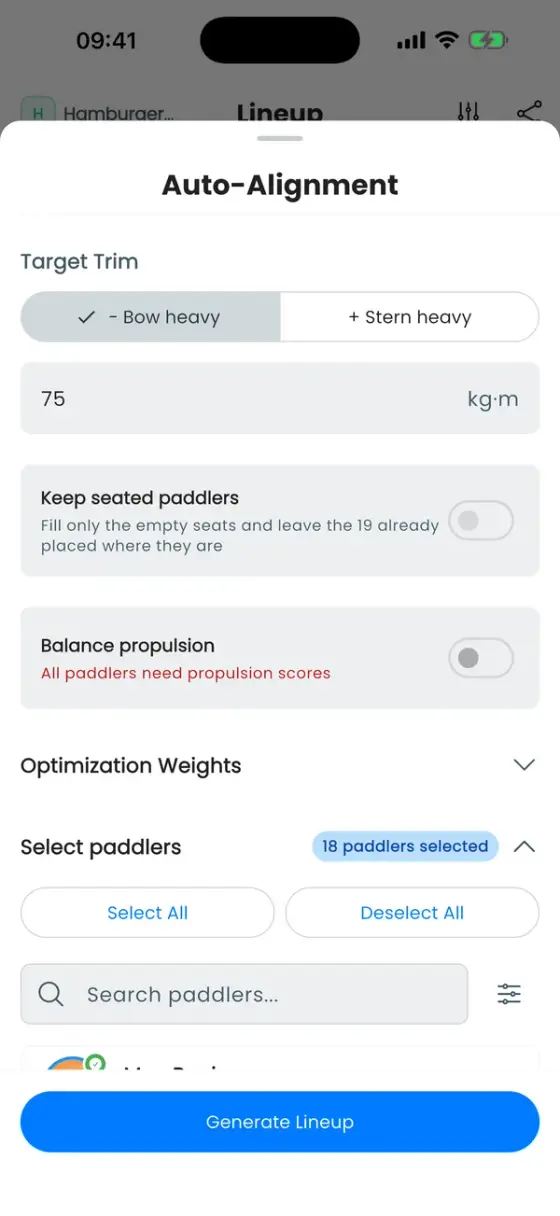
Under Target Trim you set what Auto aims for: a direction (+ Bow heavy or − Stern heavy) and a value in kg·m. Positive values mean bow-heavy, matching the side view and the Moments page. The default is +75 kg·m, slightly bow-heavy. Adjust it until the side view looks the way your steerer likes it.
How much each rule matters
In the Auto-Alignment sheet, open Optimization Weights. Five rules have a level from Ignore to Critical:
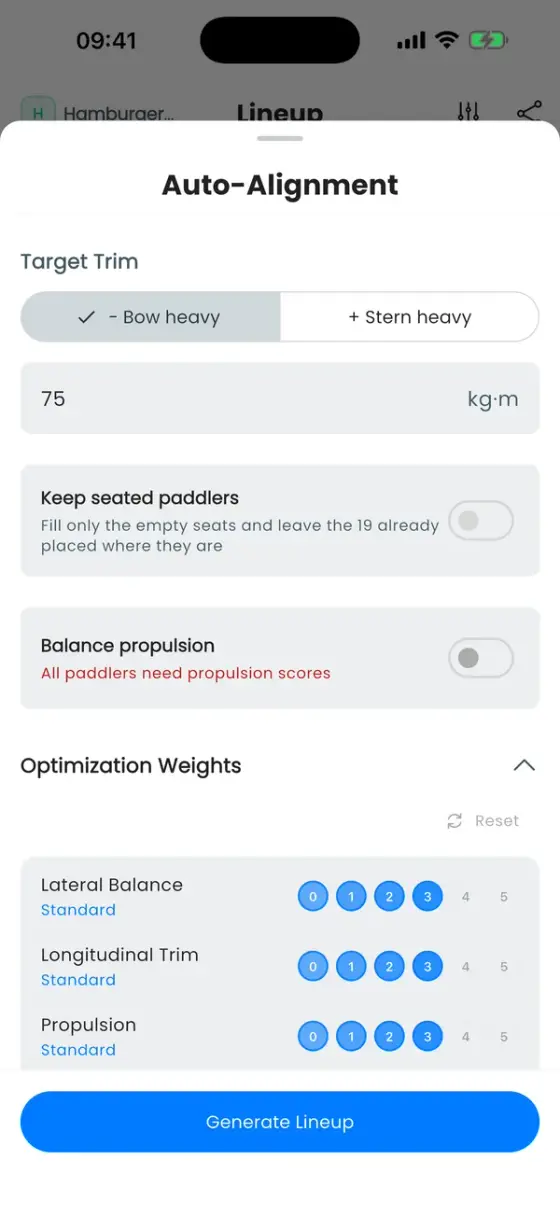
- Lateral Balance: left against right.
- Longitudinal Trim: bow against stern, towards your target trim.
- Propulsion: power on both sides.
- Side Preference: paddlers on their preferred side.
- Section Preference: paddlers in their preferred part of the boat.
The levels are Ignore, Low, Slight, Standard, Important and Critical. Each step up makes Auto care noticeably more about that rule compared with the others. Standard everywhere is a well-tested starting point. Reset above the sliders brings it back.
Example: set Side Preference to Critical and Auto accepts a slightly less perfect balance to keep everyone on their side. Set it to Ignore and Auto seats people purely for balance.
Same input, same lineup
Auto doesn't roll dice. Tap it twice without changing anything and you get the same boat, which makes it easy to see the effect of one change. To get a different result, change something: who is selected, a pin, a lock, a slider, the target trim, or a paddler's profile.
Auto runs on our server and takes a moment, so it needs an internet connection. You can always place paddlers by hand offline.
Why someone ends up in a surprising seat
These are the cases we hear about most, and what's behind them:
- A heavy paddler sits on bench 1. They are marked as Stroke. Auto treats the stroke seat as more important than a slightly bow-heavy boat. Remove the Stroke role or pin someone else to bench 1.
- Someone sits on their non-preferred side. Side preference is a wish, not a rule. If keeping everyone on their side would leave the boat clearly heavier on one side, balance wins. Raise Side Preference to Important or Critical, or set an Excluded Side if it really must not happen.
- Section preferences are ignored. Position preference is the gentlest nudge of all. Raise Section Preference or pin the paddler.
- The balance looks slightly off. Small differences that don't matter on the water are deliberately accepted. Auto doesn't chase a perfect zero.
- The front and back benches are empty. With fewer paddlers than seats, Auto fills the boat from the middle outwards. Lock the seats you want empty, or pin paddlers where you want them.
- I locked one seat on bench 1 and the whole bench stayed empty. Auto treats the first fully open bench as the stroke bench. Benches in front of it stay empty unless someone is pinned there.
- Auto rearranged paddlers I had already placed. Only pinned paddlers stay put. Switch on Keep seated paddlers to fill only the empty seats.
- Generate Lineup is greyed out. A selected paddler has no weight, or an implausible one. The sheet names them: tap Deselect them, or add the weight on the Team tab. Pinned paddlers, the drummer and the steerer always stay in the run, so unpin them or add their weight.
- Someone is missing from the boat. If you selected more paddlers than there are seats, the rest stay on the bench. After the run, a message lists who was Not placed, with Undo if you'd rather try again.
How to steer it
- Pin the paddlers you've already decided on (drummer, steerer, your strokes, a pair that always sits together), then let Auto fill the rest. See Pin paddlers and lock seats.
- Lock seats you don't want used.
- Select only the paddlers who are actually coming. On an empty boat for an event with RSVPs, the paddlers who said Going are preselected. Once paddlers are seated, those are preselected instead.
- Turn the levels up or down for what matters to your crew today.
- Keep seated paddlers fills only the empty seats around what you've already built.
- Run it, look at the result, then swap by hand. Auto is a starting point, not the final word. Your coaching eye knows things the app can't, like who paddles well together.